Use your air waybill or bill of lading, master or house, in the freight forwarder or carrier portal first. For U.S. imports, also check ACE or ACR for bill match and release messages, either through your own portal account or your customs broker. Keep those same identifiers ready for Worldwide Express operations or your forwarder in case the shipment needs a phone call instead of a screen.
TL;DR:
- Carrier portals track physical shipment movement, but do not reflect customs clearance or release status.
- Mismatched documents or incorrect identifiers, like the bill of lading or container number, are the primary causes of tracking issues.
- Setting up automated alerts and role-based portal access improves visibility and speeds up issue resolution.
- “No Bill Match” indicates the shipment cannot be released until the broker corrects the filing, often requiring coordination with customs brokers.
- International shipments typically involve layered tracking systems, making independent checks on customs and terminal statuses essential.
Table of Contents
- Three practical routes to check shipment status
- Which documents and numbers you must gather and why each matters
- How to search portals, configure alerts, and use EDI feeds
- Reading CBP and ACE status messages and what they mean for release
- If tracking shows an issue: an ordered escalation checklist
- How to use mobile apps and automated notifications
- Understanding international versus domestic order tracking differences
- Privacy and security considerations when tracking orders online
- Operations manager checklist: daily routines and KPIs for shipment visibility
- How Worldwide Express supports tracking, customs brokerage, and ACE visibility
- FAQ
- Sources
Three practical routes to check shipment status
Every shipment has three layers of visibility, and each one answers a different question. Carrier portals show you where the box or container physically is: departure, arrival, transshipment, each tied to the air waybill (AWB) or container number. These systems are fast but narrow. They will tell you a vessel docked; they will not tell you whether customs has cleared your goods for pickup.
Forwarder and NVOCC portals sit one layer up. They consolidate house bill data so an importer managing multiple shipments under one master bill can see status for each individual order, which matters when a single container carries cargo for several buyers. Government systems close the loop. In the United States, ACE and ACE Cargo Release (ACR) report the release and hold status that terminals and carriers actually respect, according to CBP’s ACE Cargo Release business rules.
- Carrier portals: movement events tied to AWB or container number.
- Forwarder and house-bill portals: consolidated, order-level visibility across a shared conveyance.
- ACE/ACR: the release and hold status that determines whether cargo actually moves.
A shipment can show “arrived” in a carrier portal and still sit untouched in a warehouse because ACE has not posted a release message. Checking only one layer is the most common reason shipments appear stuck when they are actually just waiting on paperwork.
Which documents and numbers you must gather and why each matters
Before you open any portal, assemble the right identifiers. The air waybill, usually an 11-digit number issued by the airline or consolidator, is the primary reference for air freight and is typically printed at the top of the shipping label or invoice. For ocean freight, the bill of lading comes in two forms: the master bill, issued by the carrier to the forwarder, and the house bill, issued by the forwarder to the actual shipper or consignee. Terminals release cargo against the master bill, but importers usually only hold the house bill, so knowing both matters.
- Pull the AWB or master/house bill number directly from the carrier’s or forwarder’s invoice.
- Note the container number and booking reference, since terminals map these to manifests independently of the bill number.
- Cross-check your purchase order number against the forwarder’s internal reference, since internal systems rarely use PO numbers as a primary key.
Pro Tip: Keep a running spreadsheet mapping PO number to AWB/BOL to container number; most “bill no match” issues trace back to a mismatch between what you searched and what the carrier filed.
The single biggest cause of stalled tracking is documentation mismatch: a bill of lading filed with a different consignee name, a weight discrepancy between the invoice and the manifest, or a container number typo. Trade notes that small discrepancies in documents like the AWB, bill of lading, commercial invoice, or packing list can prevent cargo release entirely. For more on searching by booking or order reference, see how to track an order with an order number in freight forwarding.
How to search portals, configure alerts, and use EDI feeds
Start with the carrier or forwarder portal’s tracking field and enter the AWB, master bill, or container number exactly as it appears on the document, including leading zeros. Most portals accept partial searches but return cleaner results with the full reference. Once you locate the shipment, look for a notification or subscription option; this is where continuous visibility actually gets built, rather than through repeated manual checks.
- Enter AWB, BOL, or container number in the carrier and forwarder portal search fields, matching formatting exactly.
- Set up e-mail or webhook alerts for status changes rather than refreshing the page daily.
- Grant role-based portal access so operations, finance, and customs teams see the same data without sharing logins.
- Ask your forwarder whether they post to ACE via ABI (Automated Broker Interface) or EDI, since that connection is what gives you visibility into bill-match status in the first place.
Pro Tip: If your volume justifies it, ask your forwarder about adding you as a Secondary Notify Party on the bill of lading; this gets you direct master- and house-level movement notifications instead of relying on relayed updates.
Forwarders and brokers who file electronically through ABI post directly into ACE, which is why a shipment can show clean carrier tracking but still lack a release message if the broker’s filing is delayed or incomplete. For ocean shipments with multiple house bills under one master, ask your forwarder explicitly for house-bill messaging or terminal and warehouse tracking rather than assuming the master bill status applies to your portion of the cargo. Worldwide Express’s guide to global track-and-trace covers how house and master visibility typically differ in practice.
Reading CBP and ACE status messages and what they mean for release
ACE and ACR post a specific sequence of status messages, and knowing what each one actually authorizes saves hours of guesswork. “No Bill Match” means the bill of lading filed by your broker has not yet matched the carrier’s manifest, which blocks release regardless of where the cargo physically sits. “Bill on File” and “Bill Departed” or “Bill Arrived” track the bill’s progress against the vessel’s own movement, according to CBP’s ACR business rules.
For ocean house bills, CBP’s OHBOL FAQ explains the 1Z, 1C, 1X, 1W, and 4Z message set. A 1Z generally signals house-level release authorization, while 1C messages roll up to the master bill once every house bill under it has cleared. A 1X or 1W typically flags a hold or exception requiring action before release proceeds. Critically, a 1Z posting does not override a terminal’s own local hold, so operations teams should check both the CBP message and the terminal’s separate hold status before assuming cargo is free to move.
- “No Bill Match” blocks release until the broker’s filed bill matches the carrier’s manifest.
- A 1Z message usually authorizes house-level release, but terminals can still hold cargo locally.
- A 1X or 1W signals an exception, often a Partner Government Agency (PGA) hold from FDA or USDA, that needs documentation before clearance proceeds.
The ACE Secure Data Portal refreshes bill-of-lading status data frequently throughout the day, per CBP’s importer fact sheet on ACE benefits, which makes it a reasonably current source for daily operational checks rather than a once-a-week report.
If tracking shows an issue: an ordered escalation checklist
When a shipment shows a hold, manifest mismatch, or no status at all, work through a fixed sequence rather than calling everyone at once.
- Confirm your own identifiers first: AWB or BOL number, container number, booking reference, and whether the invoice and packing list match the manifest filed with the carrier.
- Contact your freight forwarder’s operations desk and ask for the exact status code, not just “it’s held.”
- If the forwarder cannot resolve it, escalate to the carrier or marine terminal operator (MTO) directly, since local terminal holds sometimes sit outside the forwarder’s visibility.
- Loop in your customs broker if the hold involves ACE, ACR, or a PGA flag, since only the broker can usually correct or resubmit the filing.
- Ask specifically what corrective document is needed and the estimated time to clear once it is submitted.
Pro Tip: Request written terminal proof of release once a hold clears; verbal confirmation from a portal chat is not always sufficient if detention charges are later disputed.
For shipments that need to move between facilities before final clearance, ask your broker whether a permit to transfer (PTT) applies to your situation. Worldwide Express’s guide to tracking a freight shipment walks through this escalation sequence in more detail for both ocean and air moves.
How to use mobile apps and automated notifications
Most carrier and forwarder portals now offer a companion app or at least a mobile-responsive dashboard, and for operations teams managing shipments across time zones, this is often more useful than a desktop login. Push notifications for status changes mean you find out about a bill-match failure or a terminal hold within the refresh window rather than during a scheduled morning check.
Set notification thresholds deliberately rather than accepting every default alert. A notification for every minor scan event quickly becomes noise; a notification limited to departure, arrival, customs release, and exception or hold events keeps the signal useful. Many forwarder platforms also allow webhook integration into a company’s own transportation management system (TMS), which matters for teams tracking dozens of shipments simultaneously rather than one at a time.
Automated e-mail digests work well as a backstop for anyone not actively watching a dashboard. A daily summary covering all open shipments, flagged by status change, catches issues that might otherwise sit unnoticed over a weekend. For importers running high shipment volume, this kind of automated layer is usually what separates a team that catches a manifest hold on day one from a team that discovers it after storage fees have already started accruing. Worldwide Express’s complete 2026 tracking guide covers app and notification setup in more detail for ocean and air shipments specifically.
Understanding international versus domestic order tracking differences
Domestic parcel tracking is largely a single-system problem: one carrier, one tracking number, one continuous chain of custody from pickup to delivery. International freight tracking is layered by design, because a shipment typically passes through a carrier, a terminal, a customs authority, and often a forwarder’s own consolidation process, each with its own system and its own update cadence.
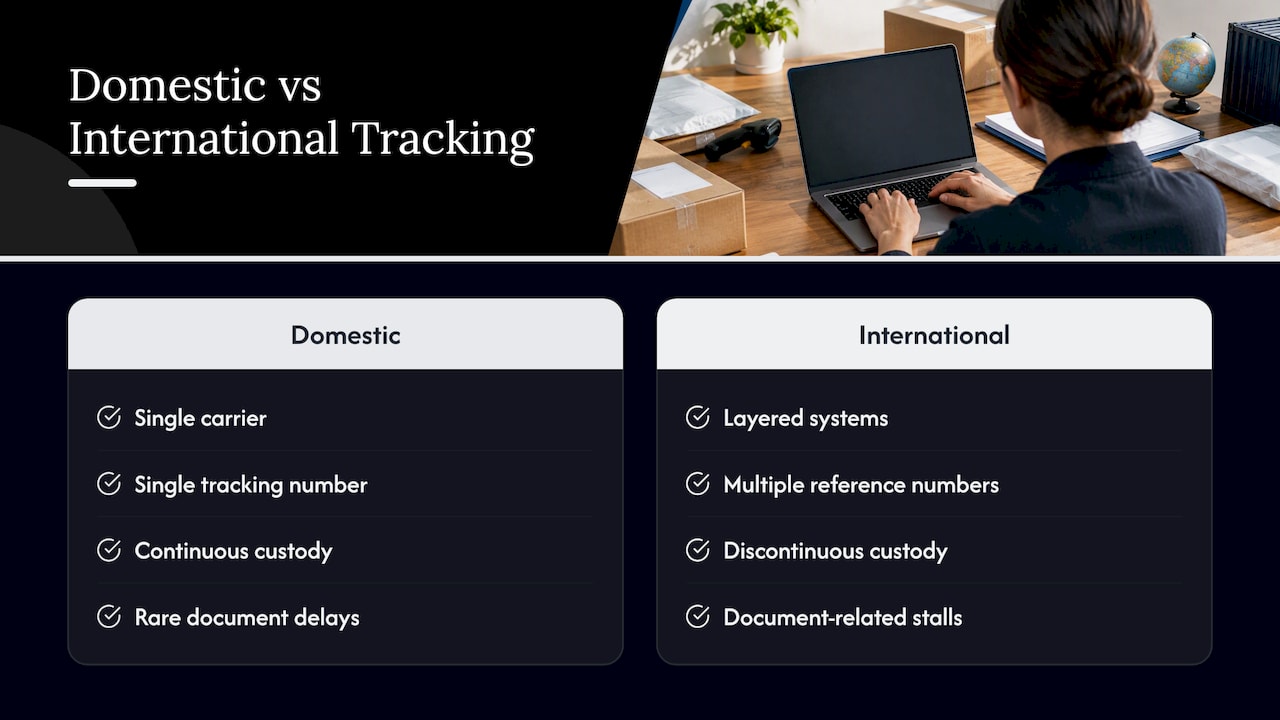
The practical difference shows up at the border. A domestic shipment’s “in transit” status rarely requires a document review. An international shipment’s status can stall not because the cargo stopped moving, but because a bill of lading has not matched the manifest in ACE, or a Partner Government Agency has not cleared a required certificate. Freight forwarders exist precisely to manage this layering, acting, as trade.gov puts it, as “travel agents for freight,” arranging transport and preparing the documentation that governs when and how that transport is formally allowed to continue.
Another difference worth planning around: domestic tracking numbers are usually unique and permanent. International shipments often involve a master bill covering multiple house bills, so the same container can appear under several different reference numbers depending on which system you check, carrier, forwarder, or customs. Knowing which number applies to which system avoids a lot of wasted searching.
Privacy and security considerations when tracking orders online
Shipment data, including consignee names, cargo values, and commercial invoice details, is sensitive business information, and portal access should be treated accordingly. Role-based access within a carrier or forwarder portal limits exposure so that only the staff who need financial or customs detail can see it, rather than sharing one login credential across an entire operations team.
Be cautious with tracking links sent by e-mail, particularly ones claiming to be from a carrier or customs authority and asking for login credentials or payment to “release” a shipment. Legitimate customs holds are resolved through a broker’s filing correction, not a payment link in an e-mail. When in doubt, log into the carrier or forwarder portal directly rather than clicking through a forwarded message.
For companies integrating EDI or API feeds into an internal TMS, confirm that the data connection uses encrypted transmission and that API keys are rotated periodically rather than left static indefinitely. This matters more for international freight than for a single parcel, since a compromised feed can expose shipment data for an entire supply chain rather than one order.
Operations manager checklist: daily routines and KPIs for shipment visibility
A disciplined daily routine prevents most tracking surprises. Check inbound ETAs, the ACE bill-match feed for any unmatched bills, outstanding PGA flags, and container or yard dwell times each morning before they compound into detention charges.
Weekly, sync with your forwarder and customs broker on any shipments sitting in exception status longer than the normal turnaround and agree on a service-level expectation for document corrections, typically 24 to 48 hours once an error is identified. Set an internal escalation threshold, for example, flagging any container approaching five days of free time remaining, so storage and detention risk gets attention before it becomes a cost rather than after.
How Worldwide Express supports tracking, customs brokerage, and ACE visibility
Tracking a shipment is only half the job when a hold or a documentation mismatch needs resolving quickly, and that is where a licensed customs broker earns its fee. Worldwide Express offers U.S. Customs Brokerage services alongside import freight services and ocean transportation services that combine electronic filing with hands-on operations support for importers who need more than a portal login.
When you reach out for help with a stalled shipment or a new quote, have your AWB or bill of lading, booking reference, and commercial invoice ready; it cuts the back-and-forth significantly. Relevant services include:
- Ocean freight: FCL, LCL, and freight deconsolidation for consolidated cargo.
- Air transportation for time-sensitive shipments.
- Cargo insurance for shipments where value or risk warrants coverage.
- FDA services for shipments subject to Partner Government Agency review.
Request a freight quote directly, or reach out through the logistics services page to talk through a specific shipment that needs attention now.
FAQ
What number do I use to track an international freight shipment?
Use the air waybill number for air freight or the bill of lading number, master or house, for ocean freight. Container numbers and booking references can also locate a shipment in carrier and forwarder systems when the bill number is not on hand.
Why does my shipment show “arrived” but still isn’t available for pickup?
Carrier tracking reflects physical movement, while customs release is a separate status tracked through ACE or ACR in the United States. A shipment can sit at a terminal fully arrived while still waiting on a bill match or a Partner Government Agency clearance, as outlined in CBP’s ACR business rules.
What does a “No Bill Match” status mean?
It means the bill of lading filed by your customs broker has not yet matched the carrier’s manifest in ACE, which blocks release regardless of the cargo’s physical location. Resolving it usually requires your broker to correct or resubmit the filing.
How often does ACE update bill-of-lading status?
The ACE Secure Data Portal refreshes bill-of-lading status roughly every two hours, according to CBP’s importer fact sheet, which makes it reliable enough for daily operational checks.
Does Worldwide Express offer customs brokerage for resolving tracking holds?
Yes, Worldwide Express provides U.S. Customs Brokerage services that handle entry filing and documentation corrections tied to ACE or ACR holds. Contact operations with your AWB or bill of lading and invoice ready to speed up resolution.