

Missing even one data point on an Importer Security Filing can trigger costly delays for an American ocean shipment. With U.S. Customs issuing penalties that can reach up to $5,000 per violation, logistics managers know the stakes are high. Clear, step by step ISF guidance helps American importers avoid mistakes, maintain compliance, and keep international cargo moving without last minute problems.
Table of Contents
- Step 1: Gather Required Shipment And Party Information
- Step 2: Identify And Verify All ISF 10 2 Form Data Elements
- Step 3: Input Details Accurately Into The ISF 10 2 Form System
- Step 4: Submit The Completed ISF 10 2 Form To U.S. Customs
- Step 5: Confirm Submission And Review CBP Compliance Status
Quick Summary
| Key Point | Explanation |
|---|---|
| 1. Gather Accurate Shipment Information | Compile all necessary details like seller, buyer, and shipment specifics for ISF 10+2 compliance. |
| 2. Verify All Data Elements | Confirm 12 mandatory data points with original documents to avoid customs penalties. |
| 3. Input Data Accurately | Enter verified details into the CBP electronic system, ensuring exactness to prevent submission errors. |
| 4. Submit Before Deadlines | Ensure your ISF is filed electronically at least 24 hours before cargo loading to comply with regulations. |
| 5. Monitor Submission Status | Track your ISF filing in the ACE portal for compliance verification and promptly address any issues. |
Step 1: Gather required shipment and party information
When completing your ISF 10+2 form, the first crucial step is collecting all the precise shipment and party details U.S. Customs will require. Advance cargo information means gathering comprehensive details about your international shipment before it leaves the origin port.
To successfully compile your documentation, you will need to collect specific data elements for each ocean shipment. This includes identifying key parties involved in the transaction such as the seller, buyer, importer of record, consignee, manufacturer, and ship-to party. You will also need critical shipment information like the country of origin, commodity details, and Harmonized Tariff Schedule codes. Precise shipment data is mandatory for ensuring smooth customs clearance and avoiding potential penalties.
Start by creating a comprehensive checklist that includes every required data point. Reach out to your supplier, manufacturer, and logistics partners to gather accurate information. Verify each detail multiple times to prevent errors that could trigger inspections or cargo delays. Organize your documents digitally and maintain backup copies for reference.
Pro Tip: Use a standardized tracking spreadsheet to collect and cross reference all required shipment and party information to streamline your ISF 10+2 filing process.
Step 2: Identify and verify all ISF 10 2 form data elements
Successfully completing your ISF 10+2 form requires meticulously identifying and verifying 12 specific data elements that U.S. Customs will scrutinize. Crucial filing components must be gathered with precision to ensure smooth import processing.
Your primary focus should be collecting the 10 mandatory importer data elements: seller name and address, buyer name and address, importer of record number, consignee number, manufacturer or supplier name and address, ship-to party, country of origin, and commodity Harmonized Tariff Schedule (HTS) number. Additionally, carriers will provide two supplementary elements: vessel stow plan and container status messages. Each data point requires careful verification to prevent potential customs penalties or shipment delays. Confirm every detail directly with your suppliers, ensuring absolute accuracy in names, addresses, identification numbers, and commodity classifications.
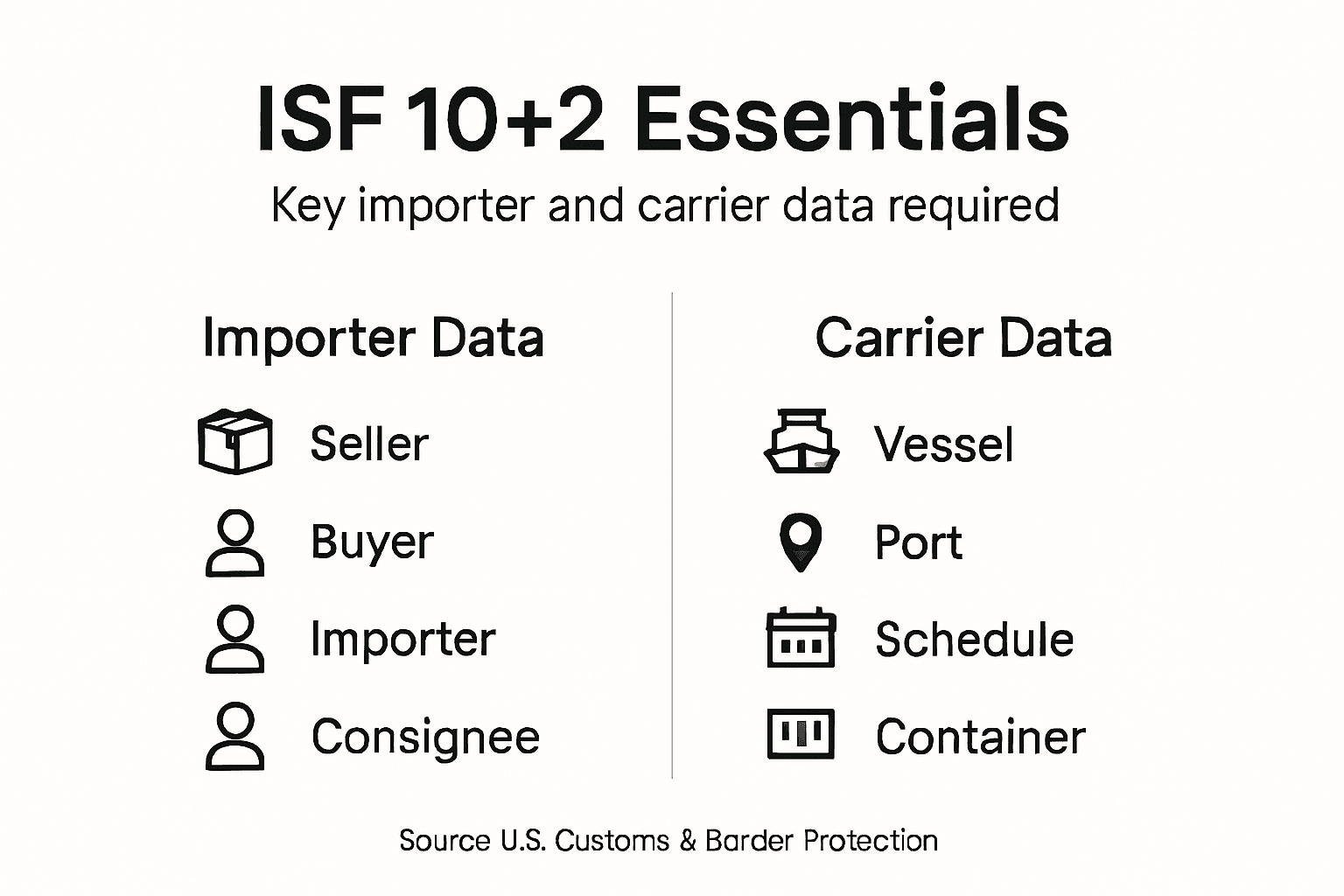
Create a systematic verification process that cross references each data element against original source documents. This might include purchase orders, commercial invoices, bills of lading, and manufacturer certificates. Double check numerical identifiers like tax ID numbers, HTS codes, and shipping references. When in doubt, contact the specific party who can definitively confirm the information.
Pro Tip: Develop a standardized internal checklist that requires two independent verifications for each critical data element to minimize the risk of errors.
Here’s a summary of all ISF 10+2 data elements and who provides them:
| Data Element | Provided By | Example/Notes |
|---|---|---|
| Seller name and address | Importer | Company exporting goods |
| Buyer name and address | Importer | Company purchasing goods |
| Importer of record number | Importer | Employer Identification Number (EIN) |
| Consignee number | Importer | Final delivery party ID |
| Manufacturer or supplier info | Importer | Factory details |
| Ship-to party | Importer | Address receiving goods |
| Country of origin | Importer | Where goods are made |
| Commodity (HTS) number | Importer | Tariff code for customs |
| Vessel stow plan | Carrier | Ship layout details |
| Container status messages | Carrier | Container movement updates |
Step 3: Input details accurately into the ISF 10 2 form system
Successfully submitting your Importer Security Filing requires precise data entry into the CBP approved electronic platform. Electronic filing requirements demand meticulous attention to ensure every data element is entered correctly before your shipment departs the foreign port.
Navigate to the authorized CBP electronic filing system and carefully input each of the 12 required data elements you previously verified. Start by creating a new filing and systematically entering information from your source documents into the corresponding form fields. Pay special attention to numeric identifiers like importer of record numbers, HTS codes, and container tracking numbers. Each field requires exact matching to your original documentation to prevent potential rejections or penalties. Ensure that addresses, names, and identification numbers are entered precisely as they appear on official documents.

Review each entered field multiple times before submission. Use the system’s built-in validation tools to cross check your entries and confirm data completeness. If the electronic platform flags any discrepancies, immediately investigate and correct them. Some systems offer helpful auto fill or template features that can reduce manual entry errors and streamline your filing process.
Pro Tip: Create a digital backup of all entered information and take screenshots of your successful submission as proof of timely and accurate filing.
Step 4: Submit the completed isf 10 2 form to U.S. Customs
Submitting your ISF 10+2 form to U.S. Customs requires precision and strict adherence to timing requirements. Electronic submission guidelines mandate that your filing must be completed electronically no later than 24 hours before cargo is loaded onto the vessel bound for the United States.
Choose between two primary electronic submission channels: the Automated Commercial Environment (ACE) or the Automated Broker Interface (ABI). If you are working with a customs broker, they will typically handle the electronic transmission. For self filing importers, log into the appropriate system and upload your carefully prepared documentation. Confirm that all 12 data elements are accurately entered and match your source documents. Pay close attention to the submission timestamp to ensure you meet the critical 24 hour pre loading requirement.
After submission, carefully review the electronic acknowledgment from U.S. Customs and Border Protection. This confirmation is your proof of timely and compliant filing. Keep a digital record of the submission receipt and any reference numbers provided by the system. If the platform returns any errors or requires additional information, address these immediately to prevent potential cargo holds or penalties.
Pro Tip: Set electronic reminders at least 48 hours before vessel loading to ensure ample time for ISF submission and potential corrections.
The table below compares methods for submitting the ISF 10+2 form electronically:
| Submission Method | User Type | Advantages | Challenges |
|---|---|---|---|
| ACE Portal | Importer/Broker | Direct filing, status tracking | Requires CBP account |
| ABI System | Customs Broker | Automated large filings | Broker setup needed |
Step 5: Confirm submission and review CBP compliance status
After submitting your ISF 10+2 form, the critical next step is verifying its acceptance and compliance status with U.S. Customs. Compliance verification tools allow importers to monitor their filing and address any potential issues before cargo arrival.
Access the Automated Commercial Environment (ACE) portal to track your ISF filing status. Review the electronic confirmation carefully for any flags or notifications from CBP. Pay special attention to validation messages that might indicate incomplete or incorrect information. Some systems provide detailed reports showing the exact status of your submission, including whether all 12 data elements have been accepted without exceptions. If any discrepancies are identified, you will typically receive specific instructions on required corrections.
Should CBP request additional information or modifications, respond promptly to prevent potential cargo holds or liquidated damage assessments. Create a systematic approach to tracking your ISF filings, maintaining digital records of all submissions, confirmations, and correspondence. Develop a checklist that helps you quickly identify and resolve any compliance issues flagged by the system.
Pro Tip: Set up automatic email notifications in the ACE system to receive real time updates on your ISF filing status and potential compliance requirements.
Simplify Your ISF 10+2 Filing with Expert Logistics Support
Accurately completing the ISF 10+2 filing is a critical step to avoid costly customs delays and penalties when importing goods into the United States. This article highlights the complexity of gathering precise shipment and party information, verifying detailed data elements, and submitting everything electronically within strict timeframes. These challenges can create stress and expose your shipments to compliance risks.
Worldwide Express, Inc. understands these pain points and offers comprehensive customs brokerage and freight forwarding services tailored to take the burden of ISF 10+2 compliance off your shoulders. Our expert team ensures timely and accurate filings with U.S. Customs, provides real-time cargo tracking, and streamlines your entire international shipping process. Partner with us to turn complex regulatory demands into efficient, worry-free imports with our global logistics solutions.
Ready to avoid costly errors and delays in your import shipments Explore Worldwide Express solutions today.
Let Worldwide Express guide you through smooth customs clearance and ISF filings so you can focus on growing your business with confidence. Get started now by visiting our website or contacting our team to request a tailored freight quote.
Frequently Asked Questions
What information do I need to complete the ISF 10+2 form?
To complete the ISF 10+2 form, you need accurate shipment and party details, including the seller and buyer names, importer of record number, consignee details, and the country of origin. Gather this information from your suppliers and logistics partners to ensure accuracy.
How can I ensure the data I enter into the ISF 10+2 form is correct?
You can ensure accuracy by systematically verifying each of the 12 required data elements against original documents. Create a checklist and double-check details like names and identification numbers to avoid errors that could lead to penalties.
What are the consequences of incorrectly filing the ISF 10+2 form?
Incorrectly filing the ISF 10+2 form may result in customs penalties, shipment delays, or additional inspections. To minimize risks, submit your form by carefully reviewing all details before the 24-hour deadline.
How do I submit the completed ISF 10+2 form?
You can submit the completed ISF 10+2 form through the Automated Commercial Environment (ACE) or the Automated Broker Interface (ABI). Log into the chosen system, enter all verified data, and ensure submission within the required timeframe to avoid delays.
How can I track the status of my ISF 10+2 submission?
You can track the status of your ISF 10+2 submission by accessing the ACE portal. Review the electronic confirmation for any flags or notifications indicating required corrections or compliance issues, which ensures smooth processing before cargo arrival.
What should I do if I receive a compliance flag from U.S. Customs?
If you receive a compliance flag from U.S. Customs, respond promptly with the required information or corrections. Address any discrepancies immediately to prevent potential cargo holds or additional penalties.
Recommended
- Entry Summary 7501 in U.S. Imports: Ensuring Compliance – Worldwide Express, Inc.
- 7 Essential Importer Security Filing Tips for Success – Worldwide Express, Inc.
- Import License Requirements: Ensuring U.S. Trade Compliance – Worldwide Express, Inc.
- How to Complete a Customs POA Form for U.S. Imports – Worldwide Express, Inc.