TL;DR:
- Tracking a delivery involves monitoring a shipment’s real-time location and status using a unique tracking number assigned at label creation. Using retailer portals, carrier websites, or multi-carrier tools helps manage shipments effectively, especially when combined with push notifications and proper documentation. Treating tracking as an active workflow and recording all evidence ensures timely resolution of issues and improved shipping management.
Tracking a delivery is the process of monitoring a shipment’s real-time location and status using a unique identifier assigned at the point of label creation. Carriers like UPS, FedEx, USPS, and DHL each operate tracking systems that update automatically as your package moves through their networks. Retailer platforms like Amazon add another layer, centralizing order details, split shipments, and estimated arrival windows in one place. Knowing how to track a delivery correctly saves time, prevents missed packages, and gives businesses the visibility they need to manage supply chains with confidence.
How to track a delivery with a tracking number
A tracking number is the single most important piece of information in any shipment. It is a unique alphanumeric code, 8–40 characters long, assigned to your package at the moment a shipping label is created. Every scan that package receives at a transit checkpoint, whether by barcode reader, RFID scanner, or GPS device, writes a new event to its digital history. That history is what you see when you check the status online.
Tracking numbers are not the same as order reference numbers. An order number identifies your purchase in a retailer’s system. A tracking number identifies the physical package inside a carrier’s network. Confusing the two is one of the most common reasons people cannot locate their shipment.
Here is what a tracking number looks like across major carriers:
| Carrier | Format Example | Length |
|---|---|---|
| UPS | 1Z999AA10123456784 | 18 characters |
| FedEx | 123456789012 | 12–22 characters |
| USPS | 9400111899223397658538 | 22 characters |
| DHL | 1234567890 | 10–11 characters |
The key milestones you will see in a tracking event history include:
- Label created: The shipper has printed the label but not yet handed the package to the carrier.
- In transit: The package is moving between facilities.
- Out for delivery: The package is on a local delivery vehicle headed to your address.
- Delivery exception: Something interrupted the delivery, such as an incorrect address or a failed access attempt.
- Delivered: The carrier has recorded a successful drop-off.
Pro Tip: Save your tracking number immediately after purchase. Copy it into a notes app or email folder labeled “Active Shipments” so you never have to dig through order confirmation emails at the last minute.
How do i use retailer and carrier websites to track my order?
The most reliable starting point for tracking your order is the retailer’s account portal. Retailer websites centralize order histories, tracking numbers, split shipment details, and estimated delivery dates in one place. That context is often more useful than a carrier site alone, which only shows you what happens after the label is scanned.
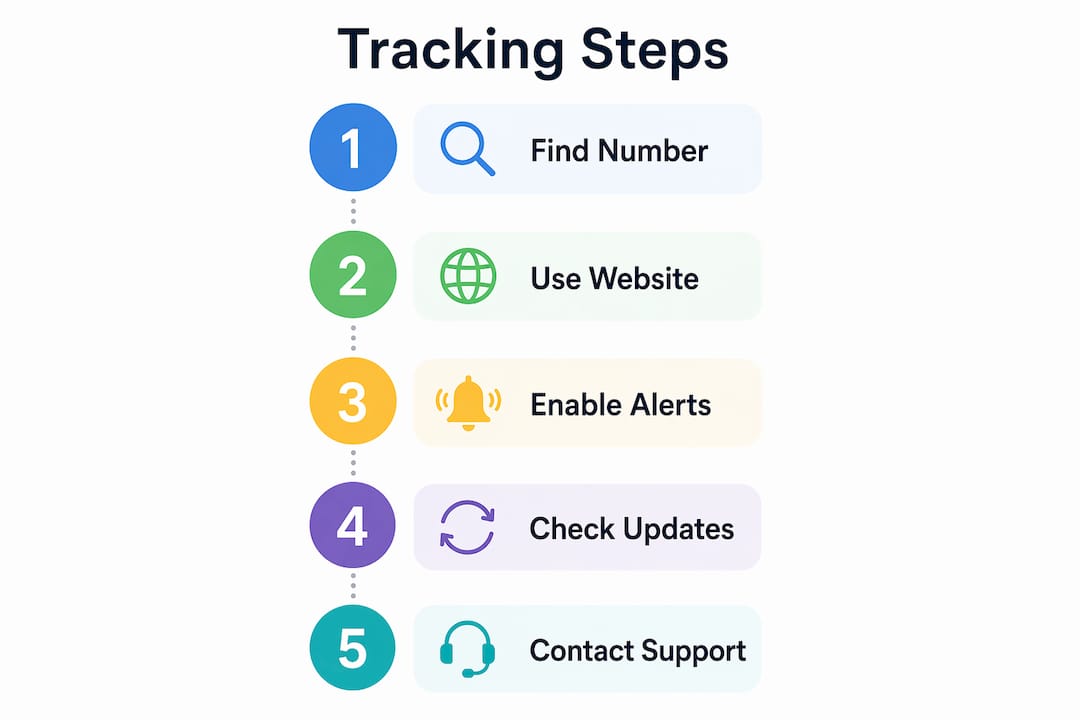
Follow these steps to track your order effectively:
- Log into your retailer account. Go to your order history and find the specific purchase. Amazon, Walmart, and most major retailers display a “Track Package” button directly on the order detail page.
- Locate the tracking number. It appears next to the shipment details. Click it to be redirected to the carrier’s tracking portal, or copy it for manual entry.
- Enter the number on the carrier’s site. UPS tracking lives at ups.com, FedEx at fedex.com, USPS at usps.com, and DHL at dhl.com. Paste your number into the tracking field and hit search.
- Check for multiple shipments. Large orders often ship in separate boxes with separate tracking numbers. The retailer portal lists all of them. The carrier site only shows the one you entered.
- Use a multi-carrier tracker if the carrier is unknown. Tools like AfterShip or 17TRACK auto-detect the carrier from the tracking number format and route you to the correct data feed.
If no tracking number is available, shipments can often be located using a reference number such as your order number or ZIP code, provided the shipper configured that option with the carrier. When that fails, contact the seller directly. They have access to the shipment record on their end.
| Method | Best For | Limitation |
|---|---|---|
| Retailer portal | Full order context, split shipments | Pre-shipment status only |
| Carrier website | Real-time transit updates | One shipment at a time |
| Multi-carrier tracker | Unknown carrier, multiple orders | May lag behind carrier site |
Pro Tip: Bookmark the carrier’s tracking page directly rather than navigating through Google each time. A saved bookmark with your tracking number pre-filled in the URL cuts lookup time to seconds.
How do mobile apps and notifications improve delivery tracking?
Push notifications are the most underused feature in delivery tracking. Most people check tracking status manually, which means they often miss the narrow window between “Out for Delivery” and “Delivered.” Enabling push notifications on carrier apps closes that gap entirely.

The UPS Mobile app, FedEx Delivery Manager, and USPS Informed Delivery each offer free push notification services. Setting them up takes under two minutes and requires only your contact information or account login. Once active, the app sends an alert the moment your package status changes.
The notifications that matter most are:
- Out for Delivery: Your package is on the truck. Plan to be home or arrange a secure drop-off location.
- Delivery Exception: Something went wrong. Act quickly by contacting the carrier before the package is returned to sender.
- Attempted Delivery: The driver came but could not complete the drop-off. Reschedule or redirect immediately.
- Delivered: Confirmation with timestamp. Check your door or mailbox right away.
Many carriers also send automatic SMS and email updates at key shipment moments, requiring no app download at all. You simply need to confirm your contact information is correct with the retailer at checkout. For businesses managing high shipment volumes, multi-carrier apps like AfterShip consolidate all active shipments into a single dashboard, eliminating the need to check multiple carrier sites individually.
Pro Tip: Turn on “Delivery Exception” alerts specifically. Most people only enable “Delivered” notifications, but exception alerts are the ones that require you to act fast and prevent a package from being returned.
What should you do when delivery tracking goes wrong?
Tracking is best treated as a workflow, not a single status check. When something goes wrong, the steps you take in the first 24–48 hours determine how quickly the issue gets resolved.
Follow this process when your tracking shows a problem:
- Verify the address on the order. A mismatched ZIP code or apartment number is the most common cause of delivery exceptions. Check your order confirmation before contacting anyone.
- Wait 24 hours after a “Delivered” status. Carriers sometimes scan packages as delivered slightly before the physical drop-off. Neighbors may also have received your package by mistake.
- Document everything immediately. Take screenshots of the tracking page with timestamps. If the carrier app shows a delivery photo, save it. Organized evidence including GPS coordinates from the delivery photo accelerates carrier investigations significantly.
- Contact the seller first. Most retailers have faster resolution processes than carriers for lost packages. Amazon, for example, can issue a replacement or refund within hours for Prime-eligible orders.
- File a claim with the carrier. UPS, FedEx, and USPS each have formal claims processes accessible through their websites. Provide your tracking number, proof of value, and all documented evidence.
“To resolve ‘delivered but not received’ cases, maintain an organized, documented timeline with photos, delivery coordinates, and tracking evidence for investigations.” — Packages.top Delivery Issue Resolution
For business shippers, tracking high-risk shipments requires an additional layer of documentation. Keep a record of every status change for shipments above a certain value threshold. That record becomes your primary evidence if a claim escalates.
Multi-carrier trackers vs. official carrier portals: which is better?
The answer depends on what you need at that moment. Carrier official websites provide the most immediate and accurate tracking status because they pull directly from the carrier’s internal database. Third-party aggregators like AfterShip or 17TRACK query that same database through an API, but they do so on a polling schedule. That means their data can lag behind by minutes or even hours during peak shipping periods.
| Tool Type | Update Speed | Best Use Case | Drawback |
|---|---|---|---|
| Carrier website | Real-time | Single shipment, urgent status | One carrier at a time |
| Multi-carrier app | Slight delay | Multiple shipments, mixed carriers | API polling lag |
| Retailer portal | Near real-time | Pre-shipment and order context | Limited post-delivery detail |
The practical approach is to use both. Check the carrier’s official site when you need the most current status, especially for time-sensitive deliveries. Use a multi-carrier app for day-to-day monitoring of multiple shipments without logging into several different portals. For businesses managing cargo tracking across global routes, combining both methods with automated alerts creates the most complete picture of shipment health.
Third-party aggregators do offer one genuine advantage: they often support hundreds of carriers worldwide, including regional carriers in Asia, Europe, and Latin America that do not have widely known tracking portals. If you frequently receive international shipments, a multi-carrier tool fills gaps that no single carrier site can cover.
Key takeaways
Effective delivery tracking requires combining tracking numbers, carrier portals, retailer accounts, and push notifications into a consistent monitoring workflow.
| Point | Details |
|---|---|
| Tracking numbers are foundational | Every shipment gets a unique 8–40 character code that records each transit scan. |
| Retailer portals offer more context | Use retailer accounts for split shipments, pre-shipment status, and estimated delivery dates. |
| Push notifications save time | Enable carrier app alerts for “Out for Delivery” and “Delivery Exception” to act fast. |
| Carrier sites are the most accurate | Official carrier portals update in real time; third-party tools may lag by minutes to hours. |
| Document issues immediately | Screenshots, timestamps, and delivery photos are required evidence for lost package claims. |
What i have learned after years of tracking shipments
The single biggest mistake I see, both from individual consumers and business shipping teams, is treating tracking as a passive activity. People check the status once, see “In Transit,” and assume everything is fine. Then the package sits at a regional hub for three days and nobody notices until the delivery window has passed.
My personal setup is straightforward. I use FedEx Delivery Manager and UPS My Choice for domestic shipments, both configured to send push notifications for every status change, not just delivery. For international freight, I rely on carrier-specific portals first and cross-reference with a multi-carrier tool only when the carrier is a regional operator without a well-known tracking page.
The part most articles skip is the documentation habit. I keep a simple spreadsheet for any shipment above $500 in value. It logs the tracking number, carrier, expected delivery date, and a note for every status update. That spreadsheet has resolved two carrier claims in under 48 hours because I had timestamped evidence ready before the carrier even asked for it.
For businesses, the gap between personal and professional tracking is not the tools. It is the process. A business shipping 50 packages a week needs a defined escalation path: who checks tracking daily, who contacts the carrier when an exception fires, and who files the claim if a package goes missing. Without that structure, shipments fall through the cracks regardless of how good the tracking technology is.
The notification settings are where most people leave real value on the table. Turning on “Delivery Exception” alerts specifically, as opposed to just “Delivered” notifications, is the single configuration change that has saved me the most headaches. Exceptions require action. Delivery confirmations do not.
— Ian
Track smarter with Worldwideexpress
Managing deliveries across multiple carriers and international routes adds complexity that standard consumer tools were not built to handle.
Worldwideexpress provides businesses with real-time shipment visibility across air, ocean, and ground freight, backed by a team that monitors exceptions and escalates issues before they become costly delays. From customs clearance to last-mile delivery confirmation, the logistics services at Worldwideexpress are built for businesses that cannot afford to lose track of a shipment. Explore the full suite of global shipping tools to see how Worldwideexpress can replace manual tracking with a system that works around the clock for you.
FAQ
What is a tracking number and where do i find it?
A tracking number is a unique 8–40 character code assigned to your shipment at label creation. You can find it in your order confirmation email or inside your retailer account under order details.
How do i track a package with just an order number?
Some carriers allow shipment lookup using a reference number like an order number or ZIP code if the shipper configured that option. If that does not work, contact the seller directly for the carrier-assigned tracking number.
Why does my tracking number show no updates?
A tracking number shows no updates when the carrier has not yet scanned the package into their network. This is common in the first 24 hours after label creation, especially with third-party sellers.
What should i do if my package shows delivered but i never received it?
Wait 24 hours, then document the tracking page with screenshots and check with neighbors. Contact the retailer first for fastest resolution, then file a formal claim with the carrier using your documented evidence.
Are multi-carrier tracking apps as accurate as carrier websites?
Carrier websites provide real-time status pulled directly from internal databases. Multi-carrier apps like AfterShip query that data through APIs on a polling schedule, which can introduce a delay of minutes to hours during peak periods.
Recommended
- How to track a delivery truck effectively in 2026 – Worldwide Express, Inc.
- EDI Tracking for Logistics Pros: A 2026 Guide – Worldwide Express, Inc.
- Shipment Visibility Tools: A 2026 Guide for Logistics Pros – Worldwide Express, Inc.
- Avoid costly international shipping mistakes in 2026 – Worldwide Express, Inc.