TL;DR:
- Tracking shipment status is essential for visibility and planning, whether managing one package or a large freight fleet.
- Use the official carrier websites for accurate updates and verify tracking numbers in order confirmation emails or receipts before checking delivery progress.
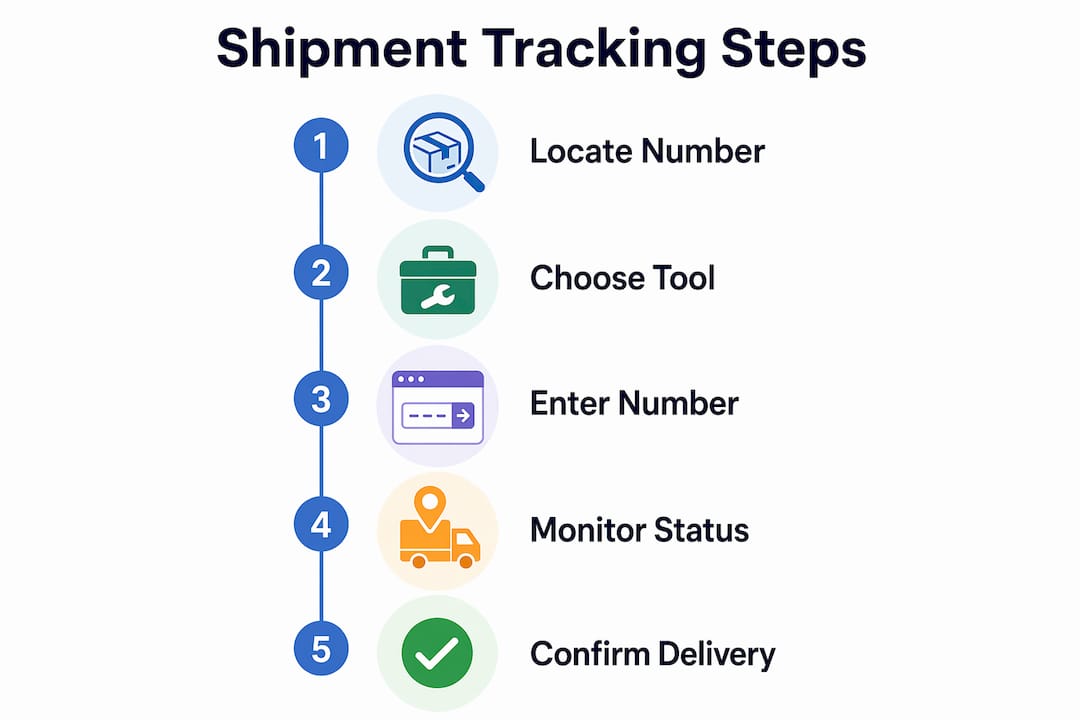
Shipment tracking is defined as the process of monitoring a package’s location and delivery status using a unique tracking number assigned at the point of shipment. Knowing how to track my shipment is no longer optional for businesses or individuals. Whether you ordered a single item from an online retailer or manage a fleet of international freight containers, real-time delivery visibility directly affects your planning, customer satisfaction, and bottom line. Carrier websites like FedEx, UPS, USPS, and DHL, along with universal platforms like ParcelsZen and Spoke Package Tracker, make this process accessible to anyone with an internet connection.
How to track my shipment: finding your tracking number first
Your tracking number is the single most important piece of information in the entire delivery process. Without it, no carrier portal or universal platform can tell you where your package is. Tracking numbers become active 24–48 hours after purchase and appear in order confirmation emails, seller account dashboards, or physical shipping receipts.
Tracking number formats vary by carrier. FedEx uses a 12 or 15-digit numeric code. UPS uses an 18-character alphanumeric string starting with “1Z.” USPS uses a 20 to 22-digit numeric code. DHL uses a 10-digit numeric code. Knowing the format helps you verify that you have copied the number correctly before entering it into a tracking portal.
Here is where to look if you cannot find your tracking number:
- Order confirmation email: Most retailers send this automatically once the item ships. Search your inbox for the carrier name or the phrase “your order has shipped.”
- Seller account dashboard: Platforms like Amazon, eBay, and Shopify display tracking numbers under order history.
- Shipping receipt: If you dropped off a package or received one at a physical location, the receipt contains the tracking number.
- Reference or order number: Some carriers accept an order number as a secondary lookup method when a tracking number is unavailable.
Pro Tip: Save your tracking number in a dedicated notes app or spreadsheet the moment you receive it. Searching through email threads during a delivery dispute costs time and creates unnecessary stress.
What are the best tools for checking delivery status?
The carrier’s official website is the most reliable source for shipment status. Carrier portals update immediately after scan events at checkpoints, including pickup, hub arrival, out for delivery, and delivered, each with a timestamp and location. This makes them the gold standard for accuracy.

Universal tracking platforms solve a different problem. When you manage multiple orders across different carriers, logging into five separate portals wastes time. Multi-carrier platforms like ParcelsZen and Spoke automatically detect the courier from over 1,000 global services by reading the tracking number format. You enter one number, and the platform routes the query to the correct carrier.
| Tool | Best for | Carrier coverage | Push notifications |
|---|---|---|---|
| FedEx website | FedEx shipments | FedEx only | Yes |
| UPS website | UPS shipments | UPS only | Yes |
| USPS website | Domestic U.S. mail | USPS only | Yes |
| DHL website | International parcels | DHL only | Yes |
| ParcelsZen | Multi-carrier tracking | 1,000+ carriers | Yes |
| Spoke Package Tracker | Multi-carrier tracking | 1,000+ carriers | Yes |
Mobile apps from major carriers add another layer of convenience. FedEx, UPS, and USPS each offer free apps with push notification support. Push notifications for critical status changes are the most underused feature in shipment tracking. Enabling them means you receive an instant alert the moment your package is marked “Out for Delivery,” without refreshing any page manually.
Pro Tip: Use a universal platform like ParcelsZen for day-to-day multi-order monitoring, but always verify the final delivery confirmation directly on the carrier’s official website. Universal platforms occasionally lag by 30–60 minutes on final scan events.
For businesses managing high shipment volumes, supply chain visibility tools integrate tracking data across carriers into a single dashboard, which reduces the manual effort of checking individual portals.
How do you interpret tracking updates and status codes?
A tracking number is a scan event identifier, not a real-time GPS signal. This distinction matters. A “label created” status means only that the carrier received a notification from the shipper. The physical package may not have moved yet. Users should expect a 12–24 hour gap between label creation and the first physical scan.
Common tracking statuses and what they actually mean:
- Label created: The shipper notified the carrier. The package has not been scanned into the carrier’s network yet.
- Shipment picked up: The carrier physically collected the package. The clock on transit time starts here.
- In transit: The package is moving through the carrier’s hub network. Multiple scans may appear as it passes through sorting facilities.
- Out for delivery: The package is on a local delivery vehicle. Expect delivery within the same business day.
- Delivered: The carrier recorded a successful delivery scan. Check the delivery location noted in the update.
- Exception: Something interrupted normal transit. This could be a weather delay, an incorrect address, or a customs hold.
Reviewing the full chronological scan history gives far better insight into delays than reading only the summary status. A package stuck in customs, for example, will show repeated scans at the same facility. That pattern tells you the issue is regulatory, not logistical. Knowing the difference helps you decide whether to contact the carrier, the customs broker, or the seller.
For international shipments, customs holds are the most common source of unexpected delays. A package can sit at a U.S. Customs and Border Protection facility for several days without any status change. This is normal. The scan history will show the last known location, which confirms the package is not lost.
What should you do when tracking shows no movement?
Patience is the first tool. Wait at least 24 hours before escalating or assuming a tracking error. Scan events do not happen in real time at every point in the network. A package moving between two major hubs overnight may show no new scans for 18–20 hours. That gap does not indicate a problem.
Follow this sequence if your tracking shows no movement after 24 hours:
- Verify the tracking number. Copy it directly from the source rather than retyping it. A single transposed digit returns no results or pulls up a different shipment.
- Check the carrier portal directly. Universal platforms occasionally cache old data. Go to the carrier’s official website and enter the number there.
- Contact the seller. If the tracking number shows “label created” for more than 48 hours with no physical scan, the seller may not have dropped off the package yet.
- Contact the carrier. If the package shows “in transit” with no movement for more than five business days, call the carrier’s customer service line and request a trace investigation.
- Document everything. Screenshot the tracking page, note the timestamps, and save all communication with the seller and carrier.
Treat tracking documentation like a legal claim file if a package goes missing after a delivered scan. Carriers require evidence during claim investigations. Organized screenshots, delivery photos, and correspondence records speed up resolution significantly.
“Effective shipment tracking is a decision system, not guesswork. Spacing updates logically prevents panic and helps identify genuine issues for timely escalation.” — How to Track Any Package Like a Pro
Pro Tip: Set a calendar reminder to check tracking once every 24 hours rather than refreshing every hour. Frequent checking creates anxiety without producing new information. Structured intervals keep you informed without the stress.
For businesses, shipment visibility tools automate this monitoring process and flag exceptions automatically, which removes the manual burden of watching individual orders.
Key Takeaways
Effective shipment tracking requires a verified tracking number, the right platform for your carrier, and a systematic approach to reading scan histories and resolving exceptions.
| Point | Details |
|---|---|
| Locate your tracking number first | Check your order confirmation email, seller dashboard, or shipping receipt before doing anything else. |
| Use carrier sites for accuracy | Official carrier portals update immediately after scan events and are the most reliable status source. |
| Universal platforms save time | Tools like ParcelsZen and Spoke cover 1,000+ carriers and eliminate the need to log into multiple portals. |
| “Label created” does not mean shipped | Expect a 12–24 hour gap before the first physical scan appears after label creation. |
| Document issues like a legal file | Screenshots, timestamps, and correspondence records are required for carrier claims and dispute resolution. |
Tracking as a decision system, not a habit
Most people treat shipment tracking as a compulsive refresh habit. That approach produces anxiety, not information. After years of watching how both individual shippers and logistics teams handle delivery monitoring, the pattern is clear: the people who track well are the ones who treat it as a structured process.
The biggest mistake I see is conflating “no update” with “something is wrong.” A package moving by ocean freight from Shanghai to Los Angeles will show nothing for days at a time. That silence is normal. The mistake is escalating too early, which wastes time and clogs carrier support lines with false alarms.
The second mistake is relying on a single platform. Universal trackers are convenient, but they are not infallible. I always recommend verifying final delivery status on the carrier’s own website. That extra 30 seconds has saved me from filing unnecessary claims more than once.
For businesses, the real value of tracking is not knowing where one package is. It is having a system that flags exceptions automatically so your team focuses only on shipments that actually need attention. That shift from reactive to proactive monitoring is where logistics efficiency actually lives.
— Ian
How Worldwideexpress simplifies freight tracking and forwarding
Managing international shipments adds layers of complexity that standard carrier tracking cannot address alone. Customs holds, documentation requirements, and multi-leg freight routes all create gaps in visibility that frustrate both shippers and recipients.
Worldwideexpress specializes in international freight forwarding with end-to-end shipment visibility built into every service. From air and ocean freight to customs brokerage and warehousing, Worldwideexpress gives businesses the tools to monitor cargo across every leg of its journey. For teams managing cross-border logistics, the freight forwarding guide from Worldwideexpress covers the full process, from documentation to final delivery confirmation. Businesses looking to go deeper on ocean freight can also explore the ocean freight forwarding steps guide for a complete operational breakdown.
FAQ
Where is my tracking number located?
Your tracking number appears in your order confirmation email, your seller account dashboard under order history, or on your physical shipping receipt. Most ecommerce platforms display it automatically once the item ships.
How do I track goods with a tracking number from any carrier?
Enter your tracking number into the carrier’s official website or a universal platform like ParcelsZen or Spoke Package Tracker. Universal platforms automatically detect the carrier from over 1,000 global services.
Why does my tracking show no movement after the label was created?
A “label created” status means the carrier received a notification, not that the package is physically in transit. Expect a 12–24 hour delay before the first physical scan appears.
How do I check delivery status for an international shipment?
Use the carrier’s official tracking portal and review the full scan history, not just the summary status. Customs holds appear as repeated scans at the same facility and are the most common cause of international delays.
What should I do if my package shows delivered but I never received it?
Document the tracking page with screenshots, note the delivery location listed in the scan event, and contact the carrier immediately. Organized evidence including timestamps and photos speeds up carrier claim investigations significantly.